Most small businesses use email marketing reactively — sending out a newsletter whenever there’s time, with no real system behind it. Email marketing automation changes that entirely, letting you build workflows once that then run continuously in the background, nurturing leads and driving repeat sales without requiring manual effort every single day.
What Makes Email Automation Different From Regular Newsletters
Email marketing automation relies on triggered sequences — emails sent automatically based on a specific customer action (signing up, abandoning a cart, making a purchase) — rather than a single email blast sent to everyone at once regardless of where they are in the buying journey.
Workflow 1: Welcome Series for New Subscribers
When someone joins your email list, an automated welcome series (typically 3-5 emails over one to two weeks) introduces your brand, shares your best content or offers, and gradually builds trust — significantly outperforming a single generic welcome email.
Workflow 2: Abandoned Cart Recovery
- First reminder email within a few hours, simply noting items left behind
- Second email 24 hours later, addressing common objections or adding urgency
- Optional third email with a small incentive to complete the purchase
This single email marketing automation workflow alone recovers a meaningful percentage of otherwise lost sales for most e-commerce businesses.
Workflow 3: Post-Purchase Follow-Up Sequence
Automated emails after a purchase — thanking the customer, offering usage tips or related product suggestions, and eventually requesting a review — build stronger customer relationships and increase the odds of repeat purchases.
Workflow 4: Re-Engagement for Inactive Subscribers
Subscribers who haven’t opened emails in several months can be automatically moved into a re-engagement sequence, offering a special incentive or simply asking if they’d like to stay subscribed, keeping your list healthy and your engagement metrics strong.
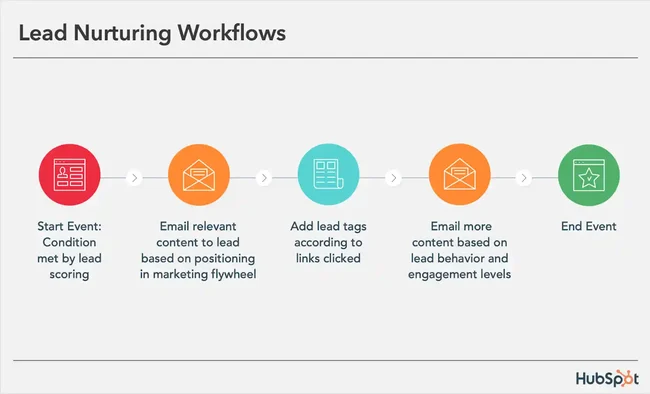
Workflow 5: Lead Nurture for Non-Immediate Buyers
Not every subscriber is ready to buy immediately. A nurture sequence sharing valuable, relevant content over weeks builds trust gradually, keeping your brand top-of-mind until the subscriber is genuinely ready to make a purchase decision.
Workflow 6: Birthday or Anniversary Offers
Automated birthday or account-anniversary emails with a small discount or gift feel personal and thoughtful, and consistently generate strong open and conversion rates compared to standard promotional emails.
Step-by-Step: Setting Up Your First Automation Workflow
Start with just one workflow — abandoned cart recovery is usually the highest-ROI starting point for e-commerce businesses. Map out the trigger, the email sequence and timing, then set it up in a tool like Mailchimp, Zoho Campaigns, or Klaviyo before expanding to additional workflows.
FAQ
What is email marketing automation and how does it differ from regular email marketing? Email marketing automation sends emails automatically based on specific customer triggers or actions, while regular email marketing typically involves manually sending the same message to an entire list at once.
What’s the easiest email automation workflow to start with? A welcome series for new subscribers is usually the simplest to set up and provides an immediate improvement over sending no automated content at all.
Do I need expensive software for email marketing automation? No — tools like Mailchimp and Zoho Campaigns offer free or affordable plans with solid automation features suitable for small businesses just getting started.
How many emails should be in an abandoned cart recovery sequence? Two to three emails spaced over a few days is a common, effective structure, balancing persistence with avoiding appearing overly pushy.
Can email automation replace personal customer communication entirely? No — automation handles repetitive, predictable communication well, but genuine personal outreach still matters for high-value relationships and complex customer situations.
How do I measure if my email automation workflows are working? Track open rates, click-through rates, and most importantly, the actual conversion or revenue generated from each specific automated workflow.
Conclusion
Email marketing automation turns your email list from a one-off communication channel into a consistent, low-effort revenue driver working continuously in the background. Start with a single high-impact workflow — whether that’s a welcome series or abandoned cart recovery — measure the results, and gradually expand as you see what actually moves the needle for your specific audience and business.
[link to related guide about local SEO checklist here] [link to related guide about reducing cart abandonment here]
Suggested image alt text:
- “email marketing automation workflow diagram on screen”
- “abandoned cart recovery email example on smartphone”
- “marketer setting up automated email sequence in software”